
Rank Tracking
How to Track Google Rankings for a Small Website
Track Google rankings with a focused keyword list, consistent search settings, and a weekly review that connects position changes to useful next steps.

You search for your product, find your website, and check again the next morning. It has moved. Your cofounder gets a different result. Search Console shows another number altogether.
Which one should you use?
For a small website, useful rank tracking starts with a repeatable question: where does a particular page appear for a particular query, in the market you want to reach? Record that consistently, then use it to decide which page deserves attention.
You can start with a handful of relevant keywords, a free spot check, and a simple weekly review. This guide walks through that setup, using a fictional invoicing SaaS as a worked example. The keywords and observations below are teaching examples, not ZevSEO customer results.
1. Choose the right way to check your rankings
Three methods are useful, but they answer different questions.
| Method | What it helps you understand | Main limitation |
|---|---|---|
| Manual Google search | What a results page looks like in your current context | Hard to repeat under identical conditions |
| Google Search Console | Which searches generated impressions and clicks for your website | Average position is an aggregated metric, not a single scheduled observation |
| A rank tracker | How selected keywords change under specified search conditions | Covers your tracked list and the tool's supported search scope |
Start by opening Search Console's Performance → Search results report. Look at queries and pages, then narrow the view to the country and device that matter to your business. Google documents these dimensions in its Performance report guide.
Use a manual search to inspect the result itself: which page is appearing, what its title says, and what other results surround it. Incognito mode is not a way to reproduce every customer's search context. Google notes that results can vary with time, place, device, and recent search history in the same report documentation.
Use a tracker when you want a repeatable record for a selected set of queries. Keep Search Console alongside it so you can connect those observations with actual search exposure and clicks.
2. Pick a small list of keywords with a job to do
Our example product helps freelancers create invoices. Its first tracking list might look like this:
| Keyword | Intended page | Why track it? |
|---|---|---|
| ExampleLedger | Homepage | Check how people searching for the brand find it |
| invoicing software for freelancers | Product page | Monitor a query closely related to the product |
| recurring invoice software | Recurring invoices feature page | Check visibility for a specific capability |
| how to invoice international clients | Educational guide | Follow a problem that potential customers need to solve |
| freelance invoice template | Template resource | Track a useful entry point before someone needs software |
ExampleLedger is a fictional name. These are candidate queries, not researched search-volume estimates or claims that a new website can rank for them easily.
For your own list, start with pages you already have and questions your product can genuinely answer. Search Console can reveal queries already producing impressions. Customer conversations, support questions, and the wording on competing results can provide additional candidates.
Five carefully chosen keywords are a reasonable first working set, not a limit or a ranking tactic. Expand when you can explain what you would do with the extra information. Tracking fifty variations of the same phrase is less helpful if they all lead to the same decision.
Write down the intended page even if another page currently ranks. That difference may become the most useful finding in your review.
3. Fix the search conditions before comparing numbers
A position needs context. Record at least:
- The exact query and target domain.
- Country or supported location, plus search language.
- Device type.
- Check date, time, and timezone.
- The ranking URL and the result scope being measured.
For our example, use United States, English, desktop, with a consistent project timezone. A founder reading this guide in another country can still choose the US market if that is where the customers are.
The timezone organizes when checks run and how dates are recorded. It does not replace the target-market setting.
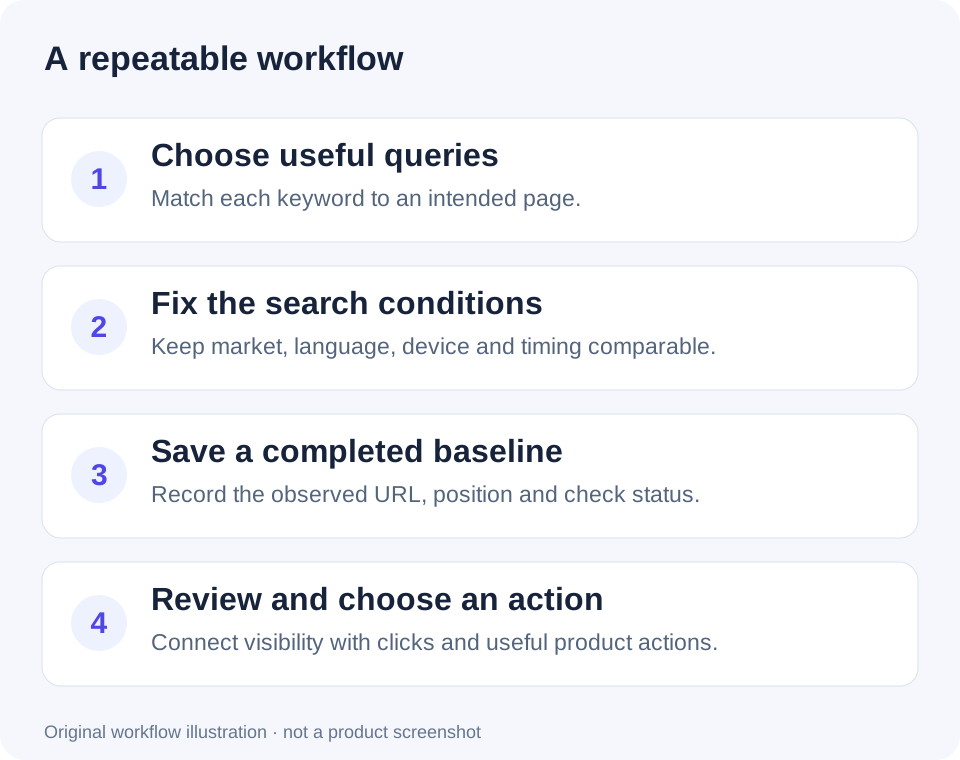
A repeatable workflow keeps changes in measurement conditions from being mistaken for changes in visibility.
If you switch market, language, or device, record it as a new comparison context. An old desktop result and a new mobile result do not establish a trend by themselves.
4. Set up a project and record the first completed check
In ZevSEO, the setup follows a short sequence:
- Create a project. Enter your domain or subdomain, without a page path, and give the project a recognizable name.
- Choose the target market and scan timezone. Select the supported country/language combination that matches your audience.
- Add your keywords. Paste one query per line, within your project's available allowance.
- Open Rankings after a check completes. Review the current rank, ranking URL, and last update. Adding a keyword is not itself a completed measurement.
The current recurring project checks use desktop results and request a search depth of 100. If you need another device or a different search scope, verify support before treating two outputs as comparable.
For a single query, the free SERP checker is a useful starting point. Match the displayed market and device to your planned monitoring context, and record its timestamp and scope. A spot check and a later project check can still differ.
Use this worksheet to preserve your baseline. It works in a spreadsheet; it is not a promise that these columns are a built-in ZevSEO export.
| Checked at, with timezone | Query | Country / language / device | Intended URL | Observed URL | Position or status | Notes |
|---|---|---|---|---|---|---|
| Fill in after the check | invoicing software for freelancers | US / en / desktop | /invoicing | Copy the result | Copy the result | First completed observation |
Download the blank ranking log CSV or copy the table into your own spreadsheet.
Keep three states distinct: not checked yet, check failed, and not found within the checked range. None should be recorded as position zero. If a tool does not distinguish these states clearly, verify the check status before deciding the page has lost visibility.
5. Review changes, then choose one action
Once you have comparable observations, ask what changed and whether it matters. The examples below are illustrative, not measured outcomes.
| Observation | What to check next | A reasonable action |
|---|---|---|
| Position moves from 18 to 16 | Same settings, same URL, enough observations? | Keep monitoring before rewriting the page |
| Homepage appears instead of the intended feature page | What task do the leading results address? | Review the feature page's relevance and internal links |
| One keyword falls outside the checked range | Check completion, URL availability, and indexing evidence | Investigate before changing content |
| Positions improve but clicks do not | Query mix, impressions, title, and search-result layout | Compare relevant Search Console data |
| Several important pages drop together | Recent releases, redirects, indexing, and tracking settings | Investigate a possible site-wide issue |
Search Console's position metric has its own aggregation rules. Google explains the calculation in What are impressions, position, and clicks?. A difference from a scheduled tracker observation does not, by itself, show that either data source is broken.
If a page appears to have disappeared, inspect it in Search Console rather than using a rank report as proof of deindexing. The URL Inspection tool provides indexing information and checks on a specific URL.
For most small teams, a practical starting routine is to collect observations consistently and make a focused weekly review. Investigate a major unexplained change promptly, but avoid rewriting a page after every small movement.
6. Connect rankings to the result your business needs
A useful ranking report ends with a decision, not a screenshot of an upward arrow.
For the example invoicing SaaS, that decision might be: “The guide is getting relevant visits, but readers cannot easily find the invoice template. Add a useful template link, then measure whether people use it.”
Review these questions together:
- Are the right pages appearing for relevant searches?
- Are those searches producing impressions and clicks?
- Do visitors take the next useful action, such as trying a template or signing up?
- Do new users reach the first meaningful product outcome?
Use your analytics or product records for onsite actions. A ranking report alone cannot establish that a new signup came from a particular keyword. Keep an annotation of page edits, releases, and tracking changes so the next review has context; an annotation supports investigation, not proof of causation.
Frequently asked questions
Can I track Google rankings for free?
Yes. Search Console shows your site's search performance, and a free SERP check can help inspect an individual query. For recurring tracking, check the current keyword and project allowances on the pricing page.
How often should a small website check rankings?
Choose a cadence you can use consistently. A practical starting point is regular observations with a weekly review, plus an extra investigation after major site changes. More checks do not automatically produce better decisions.
Does “not found” mean Google has removed my page?
No. It may mean the page was outside the checked range, the search conditions differed, or the check did not complete successfully. Confirm the measurement, then use URL Inspection if you suspect an indexing problem.
Should I track brand keywords or product keywords?
Start with both when relevant, but review them separately. Someone already searching for your brand and someone discovering a product category represent different opportunities.
Start with one market and a handful of useful queries
Choose the pages that matter, fix your search conditions, and save the first completed observations. At the next review, look for a specific question you can investigate rather than a score you need to celebrate.
Start tracking your website with ZevSEO, then add your first keywords and build a baseline you can actually compare.