
Rank Tracking
Why Google Search Console Rankings Differ from Your Rank Tracker
Search Console average position and rank tracker results can both be valid. Align the query, market, device, date and URL before investigating a ranking gap.
Search Console says your average position is 11.2. Your rank tracker says 4. You search Google yourself and find the page somewhere else again.
Before changing your page or replacing your tool, check what each number measures. Search Console summarizes search performance across a selected set of impressions. A tracker records the result of a particular check under specified conditions. Those numbers are useful together, but they do not have to match.
This guide gives you a repeatable way to investigate the gap. All numerical examples are illustrative; they are not measurements from a ZevSEO customer.
1. Understand the two measurements
In Search Console, average position describes the average position of the topmost result for the relevant grouping. The report can be viewed by query, page, country, device and date. A whole-property chart and a filtered page row therefore need different interpretations. Google describes those distinctions in its Performance report documentation.
A scheduled tracker asks a narrower question: when it checked this query in this market, using this device, where did the monitored website appear within the checked results?
| Detail | Search Console | Scheduled rank check |
|---|---|---|
| Starting point | Impressions recorded for your site | Queries you choose to monitor |
| Time context | A report period or selected date | A particular completed check |
| Market and device | Can include a mixture unless filtered | Specified by the check configuration |
| Page context | Depends on the selected grouping and filters | The matching URL found in the result set |
| Useful decision | Which searches and pages are gaining exposure and clicks? | How is a selected query changing under a consistent setup? |
If you are comparing a 28-day, all-country report with one US desktop check, a mismatch is the expected starting point of the investigation.
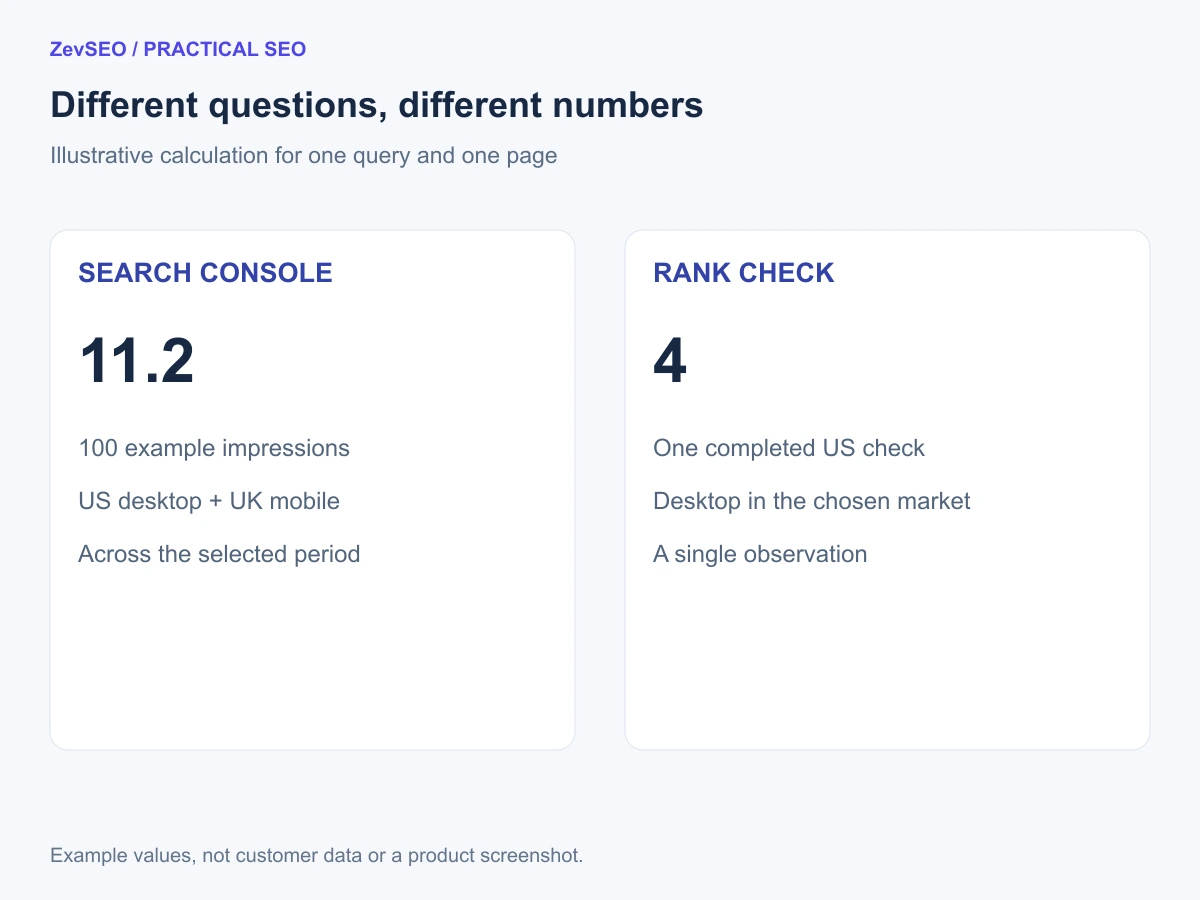
Figure 1. First compare the measurement conditions, then investigate the remaining gap. This is an explanatory diagram, not a product screenshot.
2. A worked example: position 11.2 and position 4
Imagine one query and one page, with these simplified observations during the report period:
| Search context | Impressions | Position for each observation |
|---|---|---|
| US desktop | 10 | 4 |
| UK mobile | 90 | 12 |
For this teaching example, the combined average is:
(10 × 4 + 90 × 12) / 100 = 11.2
A tracker checking US desktop can report position 4 while the combined report shows 11.2. Neither number, on its own, implies a broken measurement.
This deliberately simple calculation is not a complete specification for every Search Console result type or aggregation. Its purpose is to show why the mix of observations matters. Averaging two daily averages without their impression counts would lose that information.
Filter the report to the relevant country and device before interpreting the difference. Even then, a period average and one observation can remain different.
3. Align these six things before comparing
Use one keyword and one page as your test case. Trying to reconcile the average of an entire tracked list with an entire website report usually introduces more variables than it resolves.
The exact query
Select the query you actually track. Check whether your filter is exact or includes related phrases. A query containing a brand name answers a different question from a broad product term.
Country and language context
Match the report's country to the tracker's target market. Record the tracker's search language too. A country filter does not reproduce every language or location condition of a scheduled search.
Device
Compare desktop with desktop, or mobile with mobile. In the current ZevSEO recurring project checks, the device is desktop. Do not assume a desktop project number describes mobile visibility.
Date, timestamp and completion
Start with the same date, then record the check timestamp and timezone. Confirm the tracker finished successfully. Check the report's data freshness and whether the newest figures are preliminary. A date label alone does not prove the observations came from the same hour or reporting boundary.
The ranking URL
Compare the URL the tracker actually found with the page you filtered in Search Console. Your homepage may appear where you expected a feature page. A redirect or canonical change can also change which URL you should investigate.
If the URL identity is unclear, use URL Inspection to review the indexed page and Google's selected canonical. A live test does not replace the indexed-version information.
What counts as a position
Check the tool's result scope. An organic-result order and a position that counts other search-result elements are different measurements. Do not compare them as if both meant the same numbered blue link.
ZevSEO's current recurring project checks record the organic-result group position and request a depth of 100; the free SERP check uses a shallower result set and can display a different position convention. Keep each comparison within the same report type and conditions. A missing entry is not position zero.
4. Use a reconciliation worksheet
Copy this table into a note or spreadsheet before taking action:
| Field | Search Console side | Tracker side |
|---|---|---|
| Query | Exact selected query | Exact tracked keyword |
| Page | Selected page and canonical context | Actual matching URL |
| Country | Selected country | Configured market |
| Device | Selected device | Device used by the check |
| Time | Selected period and freshness | Timestamp, timezone and successful completion |
| Position convention | Report grouping and search appearance | Organic order or another stated convention |
For the fictional 11.2-versus-4 example, the first useful correction is narrowing the country and device, not editing the title tag.
If the filtered result still differs, preserve both observations and note the reason you have ruled out. Do not repeatedly change settings until the numbers happen to agree; that removes the consistency you need for future comparisons.
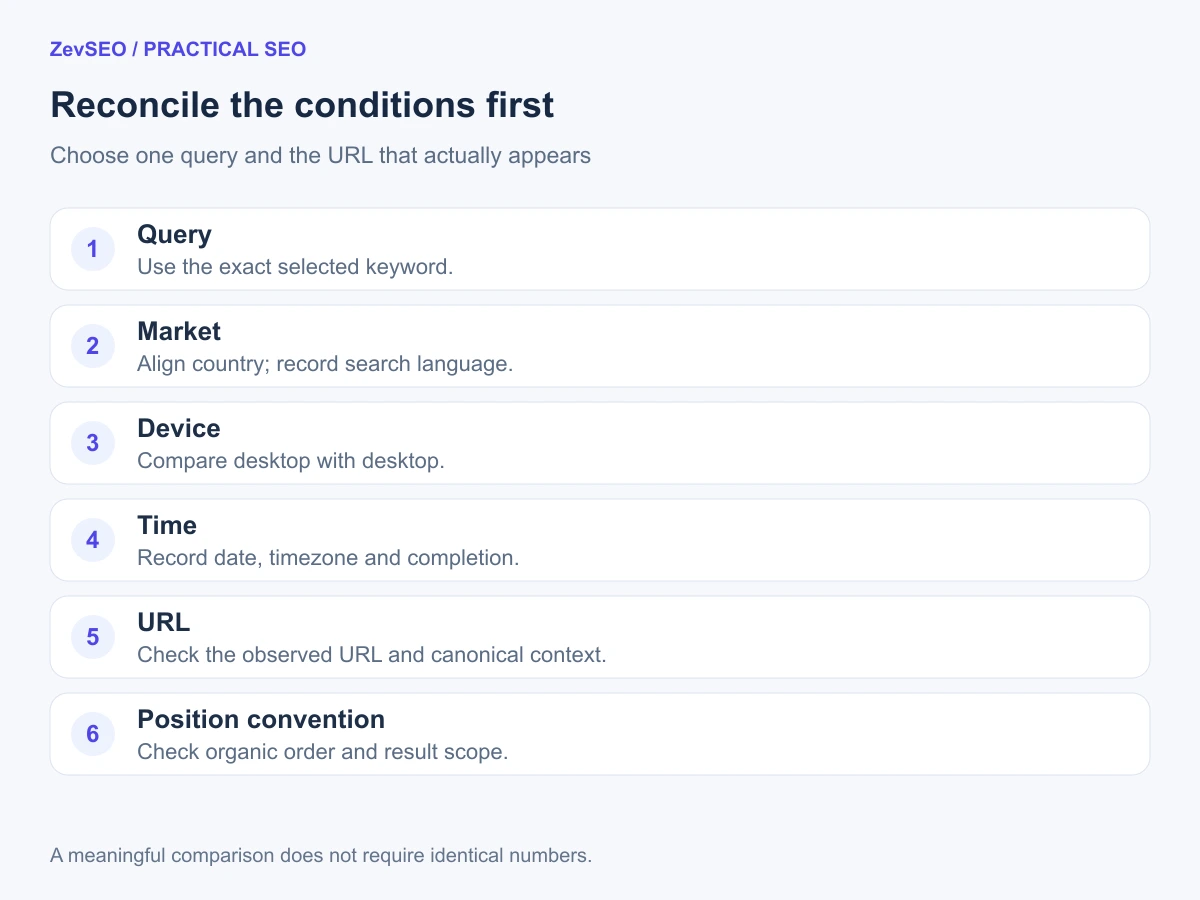
Figure 2. Work from configuration differences toward page-level evidence.
5. Decide whether the gap needs action
| What you find | A useful next step |
|---|---|
| A filter or device mismatch | Align the setup and establish a new comparison baseline |
| One small unexplained difference | Keep the record and review further comparable observations |
| A different URL appearing consistently | Check whether that page satisfies the query better and review internal links |
| A successful check falls outside its range | Inspect page availability and indexing evidence before assuming deindexing |
| Position seems better but clicks fall | Review impressions, query mix, result appearance and the affected pages |
| Several important pages change together | Check releases, redirects and site-wide configuration changes |
Google cautions that results differ with search context, so a manual search is not an automatic tie-breaker between reports. The Performance report guide explains why the same query may produce a different result when you run it yourself.
For a small website, the practical goal is to find a useful next action. A change in report composition may need an annotation. A wrong landing page may need content and navigation work. A site-wide availability issue deserves a technical investigation.
Frequently asked questions
Which number should I trust?
Use the number suited to the question. Search Console helps explain observed search exposure and clicks. A consistently configured tracker helps compare your selected queries. Investigate configuration and URL differences before treating disagreement as an accuracy verdict.
Can I make them match exactly?
You can make the comparison more meaningful by aligning the filters and conditions. You cannot turn an aggregated report into the same observation as a single scheduled search simply by selecting the same date.
Does a falling average position always mean my pages got worse?
No. Changes in the mix of queries, devices or markets can change the average. Compare important queries and pages individually, alongside impressions and clicks, before deciding what deteriorated.
What should I record when a keyword is not found?
Record the check status, timestamp and checked range. Distinguish an incomplete check from a successful check with no matching result. Neither should be treated as a valid position of zero.
Build one comparison you can repeat
Start with one important query, one market, one device and the URL that actually appears. Save the comparison conditions and revisit them consistently.
If you need a starting routine, follow our guide to tracking Google rankings for a small website. You can then set up rank tracking in ZevSEO and use a stable baseline alongside Search Console.